
How to print your free coloring samples
Choose your paper size, keep the whole drawing in view, and select the pages you want. A practical guide to printing PDF and PNG coloring samples.
By Coco Wyo LLC · Reviewed by Codex (AI), under owner delegation
Published
Start with the downloaded file
Start by downloading a file from the free-sample page. Open the downloaded PDF or PNG in a viewer that lets you preview the printed page. Printing the downloaded file gives you more control than printing the surrounding webpage, which also contains navigation and buttons.
Choose your paper, then fit the drawing
Select the size of the paper actually loaded in your printer, such as A4 or Letter. Our available sample files use custom page dimensions; they are not A4 or Letter documents. A PDF's page size and the paper in your printer can therefore be different.
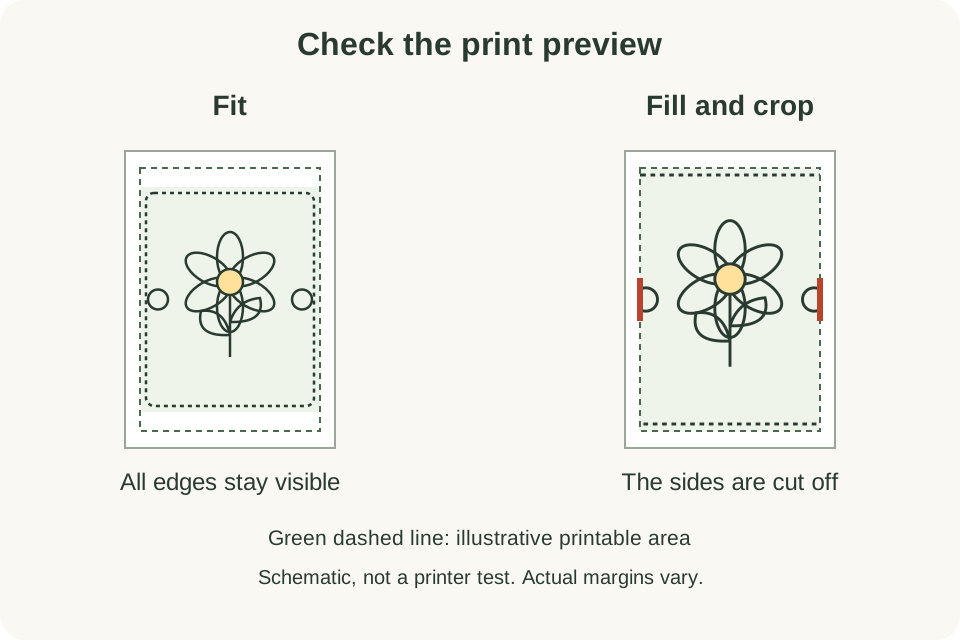
Choose the option that fits the drawing inside the printable area while keeping its proportions. The setting's name varies between viewers and printers. Avoid an option that fills the entire sheet by cropping the image. A white border can be the correct result: it allows the complete drawing to fit without stretching.
Look at the preview before printing. Check that all four edges of the drawing remain visible and that the page orientation suits it. If the preview cuts off part of the design, change the scaling or orientation before continuing.
Print only the pages you want
Some sample PDFs contain several pages. Check the page count in your viewer and select a page or range rather than automatically printing the entire file. For example, if you want only the second page, select page 2 in the print dialog and confirm that the preview shows it.
Print one test page first. Check its size and margins before using more paper. A file preview cannot predict every printer's margins, so this small check is useful even when the on-screen preview looks right.
What the PNG dimensions mean
The twelve bundled PNG samples are 2040 × 2550 pixels. Their resolution metadata corresponds to about 6.8 × 8.5 inches at 300 pixels per inch. That is a nominal print size, not a requirement to use paper of that size or a guarantee of a particular printer's output.
You can fit a PNG within your chosen paper size while preserving its proportions. Enlarging it spreads the same pixels over a larger area; if the result looks too soft, try a smaller print. Keep the original downloaded file so you can change settings without repeatedly resaving the image.
Before you color
Follow your printer's guidance for compatible paper. If you plan to use a particular coloring tool, try it on a spare sheet of the same paper first. The sample file does not establish whether your paper works well with that tool.
Ready to try a design? Return to the free samples, choose an available PDF or PNG, and start with one page. To explore printed editions, browse the book catalog and check each book's format and printed language.